If your Google Ads are not appearing at the top of Google search results, the most common reasons are low Ad Rank, uncompetitive bids, strong competition, poor ad relevance, or budget limitations. To improve your position, review your Ad Rank factors, optimize your ads and landing pages, check your bidding strategy, and monitor your Top impression share metrics in Google Ads.
Appearing near the top of search results can increase your ad’s visibility and help you reach potential customers. However, a higher position is not guaranteed by simply increasing your bids. Google considers several factors when determining which ads are eligible to appear and where they are positioned.
Follow these seven steps to understand why your ads are not appearing at the top and how to improve your campaign’s visibility. For a broader campaign improvement plan, see Ecsion’s Google Ads Optimization Guide.
Why Are My Google Ads Not Appearing at the Top?
When Google Ads are not appearing at the top, the issue is often related to Ad Rank. Ad Rank helps determine whether your ad is eligible to show and its position relative to other ads in an auction.
Google considers factors such as your bid, ad and landing-page quality, competition, the search context, and the expected impact of ad assets and other ad formats.
Common reasons include:
- Your bids are not competitive enough for top positions.
- Competitors have stronger Ad Rank in relevant auctions.
- Your ad relevance or landing-page experience needs improvement.
- Your campaign budget limits how often your ads can appear.
- Your keywords or targeting restrict the auctions you can enter.
- Your Top impression share is low compared with available opportunities.
Start by reviewing campaign diagnostics and impression share metrics. This helps you identify whether your main challenge is Ad Rank, budget, targeting, or overall campaign eligibility.
1. Improve Your Ad Rank
Ad Rank is a key factor in determining whether your ad appears and where it is positioned. If Google Ads are not appearing at the top, your ad may not have sufficient Ad Rank to compete for those positions in the auctions that matter to your business.
Ad Rank is not determined by your bid alone. Google also considers ad quality, auction context, and the expected impact of assets and other ad formats.
How to improve Ad Rank
- Open your Google Ads account and select the relevant Search campaign.
- Review keyword, ad, and landing-page performance.
- Check whether your ad copy closely matches the user’s search intent.
- Improve the usefulness and relevance of your landing page.
- Add relevant assets, such as sitelinks, callouts, and structured snippets where appropriate.
- Review your bidding strategy and determine whether your bids are competitive.
- Monitor impression share and top-of-page performance after making changes.
For example, if someone searches for “commercial roofing services,” an ad that clearly describes commercial roofing and directs users to a relevant service page may provide a better experience than a generic roofing ad linked to a broad homepage.
Important: A higher bid does not automatically guarantee a top position. Improve the factors you can control and assess results using actual campaign data.
For more specific ways to improve visibility, read Ecsion’s guide to improving Search Top Impression Share.
2. Review Your Bidding Strategy and Bids
If Google Ads are not appearing at the top, your bidding strategy may be limiting how competitively your campaign participates in auctions. This can happen when manual bids are too low or when automated bidding targets are too restrictive for the available traffic.
The right solution depends on your campaign objective, conversion data, and budget.
How to review bidding
- Open your campaign’s bidding settings.
- Identify whether you use Manual CPC, Maximize Clicks, Maximize Conversions, Target CPA, Target ROAS, or another strategy.
- If you use Manual CPC, compare your bids with available estimates and campaign results.
- If you use Target CPA or Target ROAS, review whether your target is realistic given recent performance and conversion volume.
- Check for bid limits or other settings that may constrain bidding.
- Make controlled adjustments and monitor the results.
For example, if a campaign uses Target CPA with an unusually low target, the bidding system may reduce participation in some auctions because it estimates that conversions may not meet the target.
Avoid increasing every bid simply to chase the top position. A higher position can increase costs without necessarily producing more profitable conversions.
To evaluate your bidding strategy alongside budget and conversion performance, see Ecsion’s Google Ads Optimization Guide.
3. Improve Ad Relevance and Landing-Page Experience
Ad quality can influence Ad Rank and your ability to compete in search auctions. If Google Ads are not appearing at the top, review whether your ads provide a relevant answer to the searches you want to target.
Google’s Quality Score is a diagnostic tool that includes expected click-through rate, ad relevance, and landing-page experience. It is useful for identifying areas to improve, but it is not itself the auction formula.
How to improve ad quality
- Group closely related keywords into relevant ad groups.
- Write headlines that reflect the user’s search intent.
- Explain your product or service clearly in the descriptions.
- Use specific calls to action that match the landing page.
- Ensure the landing page provides the information promised in the ad.
- Improve mobile usability, page speed, and navigation.
- Review the available Quality Score components for areas that need attention.
For example, a search for “emergency electrician near me” should lead to an ad that clearly communicates emergency electrical services and a page explaining how to contact the business.
Better relevance can help your campaign compete more effectively, but it does not guarantee a specific ad position.
The landing page also needs to make it easy for visitors to take the next step. Ecsion explains practical ways to do this in its guide to improving landing page conversion rates.
4. Check Competition and Auction Insights
Your ads compete with other eligible advertisers in each auction. Even if your campaign performs well, competitors with stronger Ad Rank can affect how often your ads appear above the organic results or other ads.
If Google Ads are not appearing at the top, use Auction Insights to understand your competitive position rather than assuming that your bids are the only problem.
How to analyze competitors
- Open the relevant Search campaign or ad group.
- Find the Auction Insights report, where sufficient data is available.
- Review metrics such as impression share, overlap rate, position-above rate, and outranking share.
- Identify competitors who frequently appear above your ads.
- Compare your ad relevance, landing pages, and bidding strategy with your own business goals.
- Decide whether to improve campaign quality, adjust bids, or focus on more relevant keywords.
Auction Insights provides information about advertisers competing in the same auctions; it does not reveal their exact bids or complete campaign settings.
You do not need to outrank every competitor for every search. Focus on auctions likely to produce valuable customers and profitable conversions.
For more guidance on evaluating competitive visibility, read Improve Search Top Impression Share: 7 Proven Tips.
5. Check Your Budget and Budget Limitations
A limited campaign budget can restrict how frequently your ads appear. If Google Ads are not appearing at the top consistently throughout the day, check whether your campaign is marked “Limited by budget” or whether your spending is being spread across many competing keywords.
Budget constraints do not directly determine Ad Rank in the same way as an auction bid, but they can limit your overall opportunity to participate in auctions.
How to manage your budget
- Review the campaign’s daily budget and spending.
- Check whether Google Ads reports the campaign as limited by budget.
- Identify which keywords, locations, and times generate qualified conversions.
- Prioritize campaigns and keywords that deliver the strongest business results.
- Consider reallocating budget from low-performing areas before increasing total spend.
- If additional budget is justified, increase it carefully and monitor performance.
For example, a local service business might benefit more from allocating budget to high-intent searches in its core service area than from spreading its budget across a large number of loosely related keywords.
Do not increase the budget solely to achieve a higher position. Confirm that additional traffic is likely to support your conversion and profitability goals.
Ecsion’s Google Ads Optimization Guide also explains how to assess campaign efficiency and reduce wasted advertising spend.
6. Improve Keyword Targeting and Search Intent
Your keywords determine which searches may trigger your ads. If your Google Ads are not appearing at the top for valuable searches, your keyword selection, match types, or targeting settings may need attention.
Broad targeting can expose your ads to many searches, while overly restrictive targeting may limit opportunities to reach relevant customers.
How to optimize keyword targeting
- Review your keyword list and match types.
- Identify the searches that generate valuable clicks and conversions.
- Use the Search terms report to understand actual search intent.
- Add relevant keyword variations when your current coverage is too narrow.
- Add negative keywords to prevent irrelevant searches from triggering ads.
- Review location, language, schedule, and other campaign targeting settings.
- Separate distinct search intents into relevant ad groups where useful.
For example, a company selling enterprise accounting software may need to distinguish searches for business software from searches for free personal budgeting tools.
Avoid expanding keywords just to increase visibility. Target the searches most likely to generate useful business outcomes.
For more details on campaign structure, keyword selection, and search intent, read Ecsion’s guide to how Google Search campaigns work.
7. Monitor Top Impression Share and Position Metrics
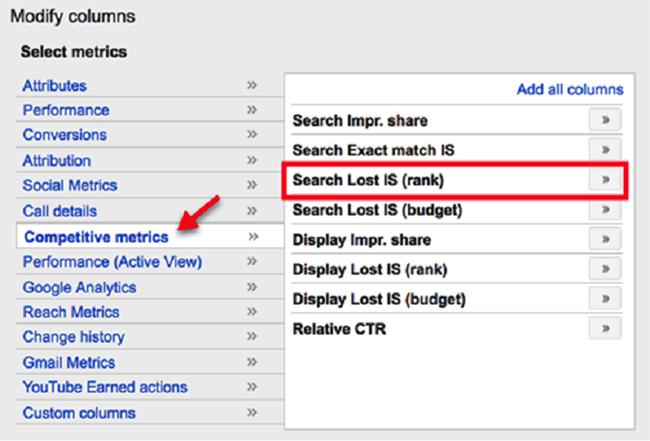
If you want to know why Google Ads are not appearing at the top, review the metrics that describe your visibility in eligible search auctions.
Two useful metrics are Search top impression share and Search absolute top impression share.
- Search top impression share: The percentage of eligible impressions you received in the top ad locations above organic search results.
- Search absolute top impression share: The percentage of eligible impressions you received in the very first ad position above organic search results.
These metrics help you understand how often your ads appear in prominent positions compared with the opportunities available to them.
How to use these metrics
- Open the relevant Search campaign.
- Customize the columns in your reporting view.
- Add Search top impression share and Search absolute top impression share.
- Review Search lost top impression share (rank), where available.
- Review Search lost top impression share (budget), where available.
- Compare these metrics across campaigns and relevant date ranges.
- Make changes based on whether rank or budget appears to be the main constraint.
Interpret the metrics carefully. A low top impression share does not automatically mean that your campaign is failing. It may be a deliberate result of a cost-conscious bidding strategy, a limited budget, or a decision to prioritize profitability over position.
The goal is to achieve the right visibility for your business, not necessarily to appear first for every search.
For additional tips on interpreting these metrics and improving visibility, explore Ecsion’s article on Search Top Impression Share.
Quick Checklist: Why Are My Ads Not Appearing at the Top?
| Possible issue | What to check | Recommended action |
| Low Ad Rank | Ad relevance, landing-page experience, bids | Improve quality and bidding competitiveness |
| Uncompetitive bids | Bidding strategy and bid estimates | Adjust bids or targets where justified |
| Strong competition | Auction Insights | Focus on valuable auctions and improve competitiveness |
| Poor ad relevance | Headlines, descriptions, landing page | Align ads with search intent |
| Budget limitations | Budget status and lost impression share | Reallocate or increase budget if profitable |
| Restrictive targeting | Keywords, match types, locations | Expand relevant opportunities carefully |
| Low Top impression share | Top and absolute top metrics | Identify rank or budget constraints |
Conclusion
If Google Ads are not appearing at the top, start by checking Ad Rank, bidding settings, campaign quality, competition, and budget limitations. Use Auction Insights to understand the competitive landscape and impression share metrics to measure how often your ads reach prominent positions.
Make improvements based on your campaign data rather than increasing bids automatically. The best strategy is to gain visibility for relevant searches while maintaining a sustainable cost per click and a profitable conversion rate.
For a more complete approach to campaign improvement, read Ecsion’s Google Ads Optimization Guide.
Frequently Asked Questions
1. Why are my Google Ads not appearing at the top?
Your ads may have insufficient Ad Rank, uncompetitive bids, lower ad relevance, strong competition, or budget limitations. Review campaign diagnostics, bidding settings, Auction Insights, and top impression share metrics to identify the likely cause.
2. How can I improve my Google Ads Ad Rank?
Improve ad relevance, landing-page experience, and the usefulness of your ad assets. Review your bidding strategy and make sure your bids are competitive for the auctions you want to enter. Higher bids alone do not guarantee a top position.
3. What is Search top impression share?
Search top impression share measures the percentage of eligible search impressions your ads received in top ad locations above organic results. It helps you understand how often your ads appear prominently compared with the opportunities available.
4. What is the difference between top impression share and absolute top impression share?
Top impression share measures impressions in the top ad locations above organic search results. Absolute top impression share measures impressions in the very first ad position. Both are useful for evaluating visibility, but neither guarantees a specific future position.
5. Does increasing my Google Ads budget improve ad position?
Increasing your budget can help a budget-limited campaign participate in more auctions, but it does not directly guarantee a higher position in each auction. Ad Rank, competition, bids, and ad quality also influence position.
6. Does a low Quality Score prevent my ads from appearing at the top?
A low Quality Score can indicate weaknesses in expected click-through rate, ad relevance, or landing-page experience. These factors are relevant to auction performance, but Quality Score is a diagnostic metric rather than a direct auction input or a guaranteed predictor of position.
7. How can I check whether my competitors rank above my Google Ads?
Use the Auction Insights report to review available competitive metrics, including overlap rate, position-above rate, and outranking share. These metrics help you understand how your ads compare with other advertisers in overlapping auctions.