If your Google Ads keywords are not getting impressions, the most common reasons are low search volume, uncompetitive bids, restrictive keyword match types, negative keywords blocking relevant searches, or overly narrow targeting. To fix the issue, check your keyword status, research search demand, review your bidding strategy, and make sure your campaign settings allow your ads to reach relevant users.
Getting impressions is the first step toward generating clicks, leads, and sales through Google Ads. If your keywords are eligible but your ads are rarely showing, follow these seven practical steps to identify the problem and improve your campaign’s visibility. You can also explore Ecsion’s Google Ads Optimization Guide for more ways to improve campaign performance and reduce wasted ad spend.
Why Are My Google Ads Keywords Not Getting Impressions?
When Google Ads keywords are not getting impressions, the cause may be related to keyword eligibility, search demand, bidding, ad quality, or campaign settings. Start by checking the Status column in your Google Ads account to understand whether your keywords are eligible, limited, paused, or disapproved.
Google Ads also provides diagnostic information to help advertisers identify issues that prevent campaigns from serving or limit their traffic. Before changing bids or adding keywords, identify the specific issue affecting your campaign.
1. Check for Low Search Volume
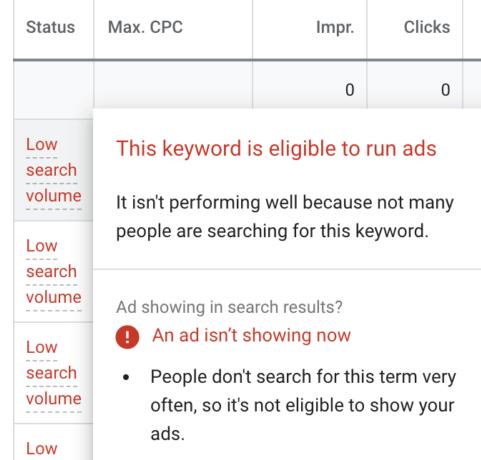
Low search volume is one of the most common reasons Google Ads keywords are not getting impressions. If people rarely search for a particular phrase, Google may mark the keyword as “Low search volume,” making it temporarily ineligible to trigger ads.
For example, a highly specific keyword such as “affordable emergency plumbing service in a small neighborhood” may receive fewer searches than “emergency plumber near me.”
How to fix low search volume
- Open your Google Ads account.
- Navigate to Campaigns → Audiences, keywords, and content → Search keywords (the exact menu labels may vary).
- Check the Status column for “Low search volume.”
- Open Google Keyword Planner and research related keyword ideas.
- Add relevant keywords with stronger search demand.
- Consider testing broader, relevant keyword variations.
Focus on keywords that match what your potential customers are likely to search for. Avoid adding unrelated high-volume keywords just to increase impressions.
Important: Increasing bids or improving ad copy will not resolve a keyword’s “Low search volume” status by itself. You need to address the lack of search demand or choose more relevant keyword variations.
2. Review Your Keyword Bids and Ad Rank
If your Google Ads keywords are not getting impressions despite having sufficient search volume, your bids or Ad Rank may be limiting visibility. Advertisers compete in auctions, and a bid that is too low or restrictive bidding targets can prevent ads from winning enough auctions to appear.
Ad Rank depends on several factors, including your bid, ad quality, auction context, and expected impact of ad assets.
To understand how bidding, ad relevance, and budget decisions affect campaign performance, read Ecsion’s guide to Google Ads optimization.
How to fix low bids
- Open your campaign and review its bidding strategy.
- Check whether your campaign has restrictive Target CPA or Target ROAS settings.
- Review available bid estimates in Keyword Planner.
- If you use Manual CPC, consider testing a more competitive maximum CPC.
- If you use automated bidding, review the strategy’s performance and any bid-target limitations before making changes.
- Monitor impressions and performance after adjustments.
Do not automatically increase every keyword’s bid. Make controlled changes based on your budget, competition, and business goals.
If your ads are appearing but rarely reaching the top of the search results, learn how to improve Search Top Impression Share in Google Ads. This can help you investigate whether budget limitations or Ad Rank are affecting your visibility.
3. Use Appropriate Keyword Match Types
Restrictive match types can limit the searches your ads are eligible to match. If your Google Ads keywords are not getting impressions and you rely entirely on exact match, you may be missing other relevant searches.
Google Ads offers three main keyword match types:
- Exact match: Provides more control over the searches that can trigger your ad.
- Phrase match: Reaches relevant searches that include the meaning of your keyword phrase.
- Broad match: Can reach a wider range of related searches and uses additional signals to determine relevance.
How to fix restrictive match types
- Review the match types assigned to your existing keywords.
- Identify relevant keywords that have limited reach.
- Test phrase match variations where additional reach is appropriate.
- Consider broad match when your campaign’s bidding strategy and conversion tracking support it.
- Review the Search terms report to see which searches trigger your ads.
- Add negative keywords to reduce irrelevant traffic.
For example, if your exact-match keyword is [digital marketing agency], you could test the phrase-match version “digital marketing agency” to explore additional relevant searches.
Expand reach carefully. More impressions are valuable only when they come from searches relevant to your products or services.
4. Check Whether Negative Keywords Are Blocking Traffic
Negative keywords help prevent ads from showing for irrelevant searches. However, an overly broad negative keyword list can also block valuable traffic, which may explain why your Google Ads keywords are not getting impressions.
For example, a business selling paid training courses might add “free” as a negative keyword. If the business also offers a free consultation, that negative keyword could unintentionally block relevant searches associated with the consultation.
How to audit negative keywords
- Open the campaign’s negative keyword settings.
- Review campaign-level and account-level negative keyword lists.
- Check shared negative keyword lists applied to the campaign.
- Compare negative keywords against the services and products you advertise.
- Look for terms that could unintentionally exclude relevant searches.
- Remove or refine negatives that are unnecessarily restrictive.
Use the Search terms report to understand actual search behavior. Make sure your negative keywords filter unwanted traffic without excluding searches that could generate qualified leads or sales.
5. Expand Narrow Location and Audience Targeting
Your campaign can have relevant keywords and competitive bids but still receive few impressions if its targeting is too narrow. Geographic restrictions, audience settings, ad schedules, and additional targeting layers can reduce the number of eligible auctions.
For example, a business targeting only a small area, a limited set of hours, and a restricted audience may have fewer opportunities to show ads than a campaign with broader, appropriate targeting.
How to fix narrow targeting
- Review your campaign’s location settings.
- Confirm that you are targeting all relevant service areas.
- Check the ad schedule for unnecessary restrictions.
- Review audience settings and determine whether “Targeting” is limiting reach where “Observation” would be more suitable for Search campaigns.
- Check device adjustments and other applicable campaign restrictions.
- Expand targeting only when the additional reach aligns with your business goals.
Do not broaden location or audience targeting without considering customer relevance. The goal is to reach more potential customers, not simply to generate impressions from people who are unlikely to convert.
6. Improve Ad Relevance and Quality
Low ad quality can reduce your ability to compete effectively in auctions. If your Google Ads keywords are not getting impressions frequently, check whether your ad copy and landing page closely match the keywords you are targeting.
For example, someone searching for “commercial roofing services” should see an ad that clearly describes commercial roofing, rather than a generic advertisement focused only on residential repairs.
How to improve ad relevance
- Group closely related keywords into relevant ad groups.
- Include the main keyword theme naturally in your headlines and descriptions.
- Explain your service or product clearly.
- Use relevant assets, such as sitelinks and callouts, where appropriate.
- Make sure the landing page provides the information promised in the ad.
- Improve landing-page speed, mobile usability, and clarity.
Review Quality Score and its available components as diagnostic indicators, not as a guaranteed formula for impression growth. Better relevance and landing-page experience can help your ads compete more effectively.
Your landing page also plays an important role in the advertising experience. Explore Ecsion’s 10 Tips for Preparing Your Website for Google Ads to improve page relevance, mobile usability, and conversion tracking.
7. Check Campaign Status, Budget, and Account Issues
Sometimes, Google Ads keywords are not getting impressions because the problem is not the keywords themselves. Paused campaigns, inactive ad groups, disapproved ads, billing problems, campaign dates, or limited budgets can prevent ads from serving as expected.
New campaigns and recently edited ads may also need time for review or automated bidding to optimize.
How to troubleshoot campaign settings
- Confirm that the campaign and ad groups are enabled.
- Check whether the ads are approved and eligible to serve.
- Verify the campaign’s start date, end date, and ad schedule.
- Review the daily budget and look for a “Limited by budget” status.
- Check account billing and any account-level restrictions.
- Review the bidding strategy and allow time for learning after significant changes.
- Use Google’s Ad Preview and Diagnosis tool to investigate why a particular search may not trigger your ad.
Avoid repeatedly changing bids, budgets, and bidding strategies in a short period. Make one or two meaningful adjustments, then review the results over an appropriate period.
How to Diagnose Google Ads Keywords Not Getting Impressions
Use this quick checklist to identify the likely cause and the next action.
| Keyword or campaign status | What it may mean | Recommended action |
| Low search volume | Too little search demand | Research related keywords |
| Eligible (limited) | A limitation may be reducing visibility | Review the status details and bidding |
| Below first page bid estimate | Ad Rank may be limiting top-of-page visibility | Evaluate bids and ad quality |
| Paused or removed | Keyword is inactive | Enable or add the keyword if appropriate |
| Disapproved | A policy or destination issue exists | Review and fix the specific issue |
| Campaign limited by budget | Budget may restrict delivery | Review spend and budget allocation |
| Eligible, but few impressions | Targeting, competition, or other auction factors may be limiting reach | Check diagnostics, search demand, and targeting |
The keyword status is a starting point, not a complete diagnosis. Review campaign diagnostics and auction-related metrics to confirm what is limiting delivery.
For another useful diagnostic metric, learn how to improve Search Top Impression Share in Google Ads. This guide explains how to investigate impression-share losses related to budget limitations and Ad Rank.
How Long Does It Take to Get Impressions After Fixing Keywords?
After making changes, impressions may begin increasing as your ads become eligible for more auctions. However, there is no guaranteed timeframe because results depend on search demand, competition, campaign eligibility, and the type of change made.
New or edited ads may undergo review, while automated bidding strategies may need time to optimize. Avoid making frequent changes before you have enough data to assess their impact.
Monitor impressions, clicks, Search impression share, and relevant conversion metrics over time. This helps you determine whether your changes are improving visibility without sacrificing traffic quality.
Final Thoughts
If your Google Ads keywords are not getting impressions, start with the keyword Status column and campaign diagnostics instead of immediately increasing bids. Low search volume, restrictive match types, negative keywords, narrow targeting, weak ad relevance, and campaign-level restrictions can all limit delivery.
Address the specific issue, make controlled changes, and monitor the results. A well-structured Google Ads campaign should aim for relevant impressions that can lead to qualified clicks, conversions, and business growth, not just a higher impression count.
For more practical ways to improve campaign efficiency, explore Ecsion’s Google Ads Optimization Guide and identify opportunities to improve targeting, reduce wasted spend, and increase valuable conversions.
Frequently Asked Questions
1. Why are my Google Ads keywords not getting impressions?
Google Ads keywords may receive no impressions because of low search volume, low bids, restrictive match types, negative keywords, narrow targeting, inactive campaigns, disapproved ads, or limited budgets. Check the keyword Status column and campaign diagnostics to identify the cause.
2. How do I fix Google Ads keywords with low search volume?
Use Google Keyword Planner to discover related keywords with stronger search demand. Consider less specific keyword variations or broader match types when relevant. Increasing bids alone will not fix a keyword’s low search volume status.
3. Can negative keywords stop my ads from getting impressions?
Yes. Negative keywords can exclude searches that would otherwise be eligible to trigger your ads. Review campaign-level, account-level, and shared negative keyword lists to identify exclusions that are too restrictive.
4. Should I switch from exact match to broad match to increase impressions?
Broad match can help expand reach, but it may also attract less relevant searches. Consider testing phrase or broad match based on your goals, budget, conversion tracking, and bidding strategy. Monitor the Search terms report to maintain traffic quality.
5. Do low bids always cause zero impressions?
No. Low bids can reduce your ability to win auctions, but zero impressions can also result from low search volume, inactive campaigns, disapproved ads, restrictive targeting, or other eligibility issues. Diagnose the problem before changing bids.
6. How can I check why my Google Ads keywords are not showing?
Review the keyword Status column, campaign diagnostics, ad approval status, budget, targeting, and bidding settings. You can also use the Ad Preview and Diagnosis tool to investigate why your ad may not show for a specific search.
7. How long should I wait after changing my Google Ads keywords?
The timing varies by change and campaign conditions. Allow time for ad review or automated bidding to adjust, and assess performance using a suitable date range. Avoid frequent changes that make it difficult to evaluate results.