If your Google Ads campaign is stuck in learning, the most common causes are recent campaign changes, restrictive Target CPA or Target ROAS settings, insufficient conversion data, and frequent adjustments that prevent Smart Bidding from stabilizing. To fix the issue, verify conversion tracking, review your bidding targets, avoid unnecessary changes, and give the bidding strategy enough time to learn from conversion activity.
Google Ads Smart Bidding uses signals such as device, location, time, and conversion patterns to adjust bids for your campaign goals. During the learning phase, performance may fluctuate while the strategy adapts to new settings or gathers data.
A learning status does not automatically mean your campaign is broken. The key is to identify whether the campaign needs more time, better conversion data, or a change to its bidding setup.
Why Is My Google Ads Campaign Stuck in Learning?
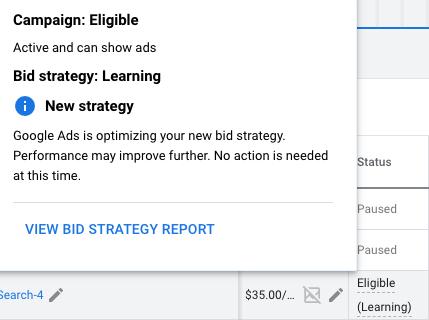
When a Google Ads campaign is stuck in learning, Smart Bidding may still be adjusting to a new strategy or a significant campaign change. This can happen after launching a campaign, changing bidding strategies, adjusting targets, or making changes that affect conversion volume.
Common causes include:
- Recently changing the bidding strategy or its settings.
- Setting a Target CPA that is too low for current performance.
- Setting a Target ROAS that is too ambitious.
- Receiving too few meaningful conversion signals.
- Having inaccurate or inconsistent conversion tracking.
- Making frequent changes to budgets, targets, or campaign structure.
Start by checking the campaign’s bidding status and recent change history. This helps you determine whether the learning phase is expected or whether a configuration problem is affecting performance.
If you are reviewing your campaign structure at the same time, Ecsion’s guide to choosing the right Google Ads campaign can help you understand which campaign type aligns with your advertising objectives.
1. Avoid Making Frequent Campaign Changes
Frequent changes are a common reason a Google Ads campaign remains unstable during learning. Significant edits to bidding strategies, conversion goals, or campaign settings can cause Smart Bidding to recalibrate or enter another learning period.
Changing settings repeatedly makes it harder to determine whether an adjustment is helping or hurting performance.
How to fix frequent campaign changes
- Open your Google Ads account and select the affected campaign.
- Review the campaign’s status and change history.
- Identify recent changes to bidding strategies, targets, budgets, and conversion goals.
- Check whether the changes were necessary to correct a genuine problem.
- Avoid making additional adjustments simply because results fluctuate for a short period.
- Monitor performance over an appropriate period before making the next change.
For example, repeatedly changing a Target CPA every day can make it difficult for Smart Bidding to adapt to a consistent target.
Important: Do not avoid necessary fixes just to preserve the learning phase. Correct broken conversion tracking, incorrect goals, or serious budget problems promptly. The aim is to avoid unnecessary changes, not to leave genuine issues unresolved.
2. Review Your Target CPA Settings
An overly restrictive Target CPA can limit the opportunities available to your campaign. If your Google Ads campaign is stuck in learning and receives very few conversions, your target may be difficult to achieve given current competition, conversion rates, and historical performance.
Target CPA tells Smart Bidding the average cost per conversion you want to achieve. It is a target, not a guarantee that every conversion will cost that amount.
How to review Target CPA
- Open your campaign’s bidding settings.
- Check whether Target CPA is enabled.
- Compare your current target with recent actual cost per conversion.
- Review conversion volume and the quality of recorded conversions.
- Determine whether the target is substantially lower than what your campaign can currently achieve.
- If necessary, test a more realistic target based on historical performance and business profitability.
- Monitor conversion volume and cost per conversion after the adjustment.
For example, if your campaign’s recent cost per qualified lead is ₹1,200 but the Target CPA is set to ₹300, the strategy may have limited opportunities to achieve that goal.
Do not increase Target CPA automatically. Choose a target that reflects your actual business economics, and consider lead quality rather than optimizing for the cheapest possible conversion.
3. Set a Realistic Target ROAS
Target ROAS can also restrict campaign performance when the target is too ambitious for the available conversion value data. If your Google Ads campaign is stuck in learning while using Target ROAS, check whether the strategy has enough reliable purchase or revenue data to pursue the target.
Target ROAS aims to achieve a desired return on advertising spend. For example, a target of 400% represents a goal of ₹4 in conversion value for every ₹1 spent, according to the conversion values reported to Google Ads.
How to troubleshoot Target ROAS
- Review your current Target ROAS setting.
- Check historical conversion value and advertising spend.
- Verify that conversion values are accurate and consistently recorded.
- Look for major changes in product prices, average order value, or conversion rates.
- Determine whether the target is realistic for your current campaign performance.
- If justified, adjust the target gradually rather than making repeated large changes.
- Monitor conversion value, cost, and actual ROAS over a suitable period.
For example, an ecommerce campaign with limited purchase data may struggle to achieve an aggressive return target, especially if product prices or customer demand fluctuate.
Avoid using a high Target ROAS simply because it looks attractive in the bidding settings. The target should reflect realistic performance and business objectives.
4. Make Sure You Have Enough Conversion Data
Smart Bidding relies on conversion signals to learn which auctions are more likely to produce valuable results. If your Google Ads campaign is stuck in learning and receives very few conversions, the strategy may have limited information with which to optimize bids.
There is no single conversion threshold that guarantees every campaign will exit learning. The time required depends on conversion volume, conversion delays, the bidding strategy, and the type of changes made.
How to improve conversion data
- Check how many conversions the campaign has recorded recently.
- Confirm that the conversions represent meaningful business outcomes.
- Review whether your conversion actions are firing correctly.
- Check whether conversions usually happen several days after an ad click.
- Ensure your campaign is not optimizing toward irrelevant or low-value actions.
- Avoid making the campaign unnecessarily restrictive if it needs more opportunities to gather useful signals.
- Allow enough time for the relevant conversion cycle to generate data.
For example, a campaign that generates only a few qualified leads each month may need more time to learn than a campaign receiving consistent daily purchases.
Do not create artificial conversions just to increase data volume. Accurate, relevant conversion signals are more useful than a large number of low-quality events.
5. Check Conversion Tracking Accuracy
A Google Ads campaign may struggle to optimize if conversion tracking is missing, duplicated, or recording the wrong events. Smart Bidding can only optimize effectively toward the signals it receives, so inaccurate conversion data can lead to poor decisions.
How to verify conversion tracking
- Open Google Ads and review your conversion action status.
- Use Google Tag Assistant to test your website’s conversion events.
- If you use Google Tag Manager, check that the correct tag fires after the intended action.
- Verify that the conversion event records successful purchases, lead submissions, or other genuine outcomes.
- Check for duplicate conversion events or overlapping tags.
- If you import conversions from GA4, confirm the property link and imported event configuration.
- Review whether your primary conversion actions match your campaign goals.
For lead-generation campaigns, a completed lead form is usually a more meaningful optimization signal than a generic button click. For ecommerce, check that purchase values and transaction IDs are recorded correctly where applicable.
If conversion tracking is broken, fix it before making major bidding changes. Otherwise, you may adjust a strategy that is reacting to incorrect data.
6. Review Your Budget and Campaign Constraints
A restricted budget can limit how often your campaign participates in auctions and how much conversion data it gathers. If your Google Ads campaign is stuck in learning, check whether the budget is sufficient for your target audience and conversion goals.
Budget limitations do not automatically cause every learning status, but they can affect delivery and the volume of useful signals available to Smart Bidding.
How to review campaign budget
- Check whether the campaign is marked as limited by budget.
- Review average daily spend and conversion performance.
- Identify keywords, locations, and audiences that generate valuable conversions.
- Check whether budget is spread across too many campaigns or low-performing areas.
- Consider reallocating budget to campaigns with stronger business results.
- Increase the budget only when the expected additional spend is justified.
- Monitor conversion volume and cost efficiency after changes.
For example, a local service business may achieve better results by concentrating its budget on high-intent searches in its core service area rather than spreading it across unrelated locations.
Avoid increasing budgets solely to make the learning status disappear. Budget changes should support a clear business objective.
Also, make sure your advertising sends users to a relevant page that supports the campaign’s goal. Ecsion’s article on website design practices for small businesses covers usability, navigation, and content decisions that can influence how visitors interact with your website.
7. Give Smart Bidding Time to Stabilize
Sometimes a Google Ads campaign is stuck in learning simply because the strategy has not finished adapting to recent changes. Conversion delays, campaign volume, and the scale of the changes can all influence how long this takes.
Google Ads may show a learning status after a new bidding strategy is introduced or certain significant changes are made. Not every edit triggers learning, and the time needed varies by campaign.
How to manage the learning period
- Check the bidding strategy status and any available explanation in Google Ads.
- Review when the most recent significant change occurred.
- Confirm that conversion tracking is working correctly.
- Avoid unnecessary changes while the strategy gathers data.
- Monitor impressions, clicks, conversions, cost per conversion, and conversion value.
- Compare performance over consistent periods, accounting for conversion delays.
- Reassess the strategy if the campaign continues to underperform beyond a reasonable adjustment period.
Do not judge Smart Bidding solely by daily fluctuations. Short-term performance can vary because of auction competition, customer demand, and the timing of conversions.
If the learning status persists alongside very poor delivery or incorrect results, investigate the campaign setup instead of waiting indefinitely.
For video-based advertising, you can also explore Ecsion’s guide on creating YouTube ads that convert to understand how campaign objectives, ad messaging, and calls to action affect results across a different Google Ads format.
Quick Checklist: Google Ads Campaign Stuck in Learning
| Possible issue | What to check | Recommended action |
| Recent campaign changes | Change history and bidding status | Avoid unnecessary edits |
| Target CPA too restrictive | Target compared with recent cost per conversion | Review and adjust if justified |
| Target ROAS too ambitious | Actual ROAS and conversion values | Set a realistic target |
| Low conversion volume | Recent meaningful conversions | Improve tracking and allow more opportunities |
| Incorrect conversion tracking | Tags, events, and conversion action status | Fix the tracking implementation |
| Limited budget | Budget status and campaign spend | Reallocate or increase budget when justified |
| Performance fluctuations | Conversion delays and consistent date ranges | Allow time for data to mature |
Conclusion
If your Google Ads campaign is stuck in learning, first check whether recent changes, restrictive bidding targets, limited conversion data, or tracking issues are preventing the strategy from stabilizing.
Avoid making frequent changes just to force the status to disappear. Instead, ensure conversion tracking is accurate, use realistic bidding targets, maintain an appropriate budget, and allow Smart Bidding time to adapt.
The ultimate goal is not simply to exit the learning phase. It is to build a campaign that consistently generates valuable conversions at a cost that makes sense for your business.
Frequently Asked Questions
1. Why is my Google Ads campaign stuck in learning?
Your campaign may be adapting to a new bidding strategy or significant changes to its settings. Restrictive targets, limited conversion data, and tracking problems can also contribute to unstable performance. Check the bidding status and campaign diagnostics before changing settings.
2. How long does the Google Ads learning phase last?
The duration varies depending on conversion volume, conversion delays, campaign history, and the changes made. Allow sufficient time for the relevant conversion cycle to generate data rather than relying on a fixed number of days for every campaign.
3. Does changing Target CPA restart the learning phase?
Significant bidding changes can trigger or extend a learning period, although the effect depends on the strategy and change. Avoid repeated adjustments unless performance data or a genuine business need justifies them.
4. Can a low budget keep my Google Ads campaign in learning?
A low budget can restrict traffic and reduce the volume of conversion signals available to Smart Bidding. However, budget is not the only cause of a learning status. Review bidding targets, conversion tracking, and campaign eligibility as well.
5. Should I pause my Google Ads campaign during the learning phase?
Not automatically. Pausing a campaign may interrupt delivery and delay the collection of useful data. Pause it only when there is a valid reason, such as a tracking problem, an incorrect offer, or a business decision to stop advertising.
6. Why is my campaign still in learning despite getting conversions?
Receiving conversions does not guarantee that a campaign will immediately exit learning. The strategy may need additional data or time to adapt to changes. Check the bidding status, conversion volume, and recent change history.
7. Should I switch from Target CPA to Maximize Conversions to exit learning?
Not solely to remove the learning status. Changing bidding strategies can trigger another adjustment period. Review your campaign goals, conversion data, and performance before deciding whether a different strategy is appropriate.