To stop irrelevant clicks on Google Ads, review your Search terms report, add negative keywords, correct your location settings, refine your audience targeting, and use suitable keyword match types. These steps help prevent ads from attracting people who are unlikely to become customers, reducing wasted ad spend and improving traffic quality.
Irrelevant clicks can consume your advertising budget without generating qualified leads, sales, or enquiries. If your Google Ads campaign receives clicks from people searching for unrelated services, looking outside your service area, or seeking something you do not offer, use the following seven steps to improve targeting and make your budget work more effectively.
Why Are My Google Ads Getting Irrelevant Clicks?
If you want to stop irrelevant clicks on Google Ads, first understand what is causing them. Common reasons include missing negative keywords, overly broad targeting, incorrect location settings, loosely related search terms, and ad copy that attracts the wrong audience.
For example, a paid plumbing service might receive clicks from people searching for free plumbing advice, DIY repair tutorials, or plumbing jobs. Although these searches relate to plumbing, they may not match the company’s goal of generating service bookings.
The solution is not necessarily to reduce all traffic. Instead, focus on attracting people whose searches, locations, and needs match your actual products or services.
1. Review the Search Terms Report.
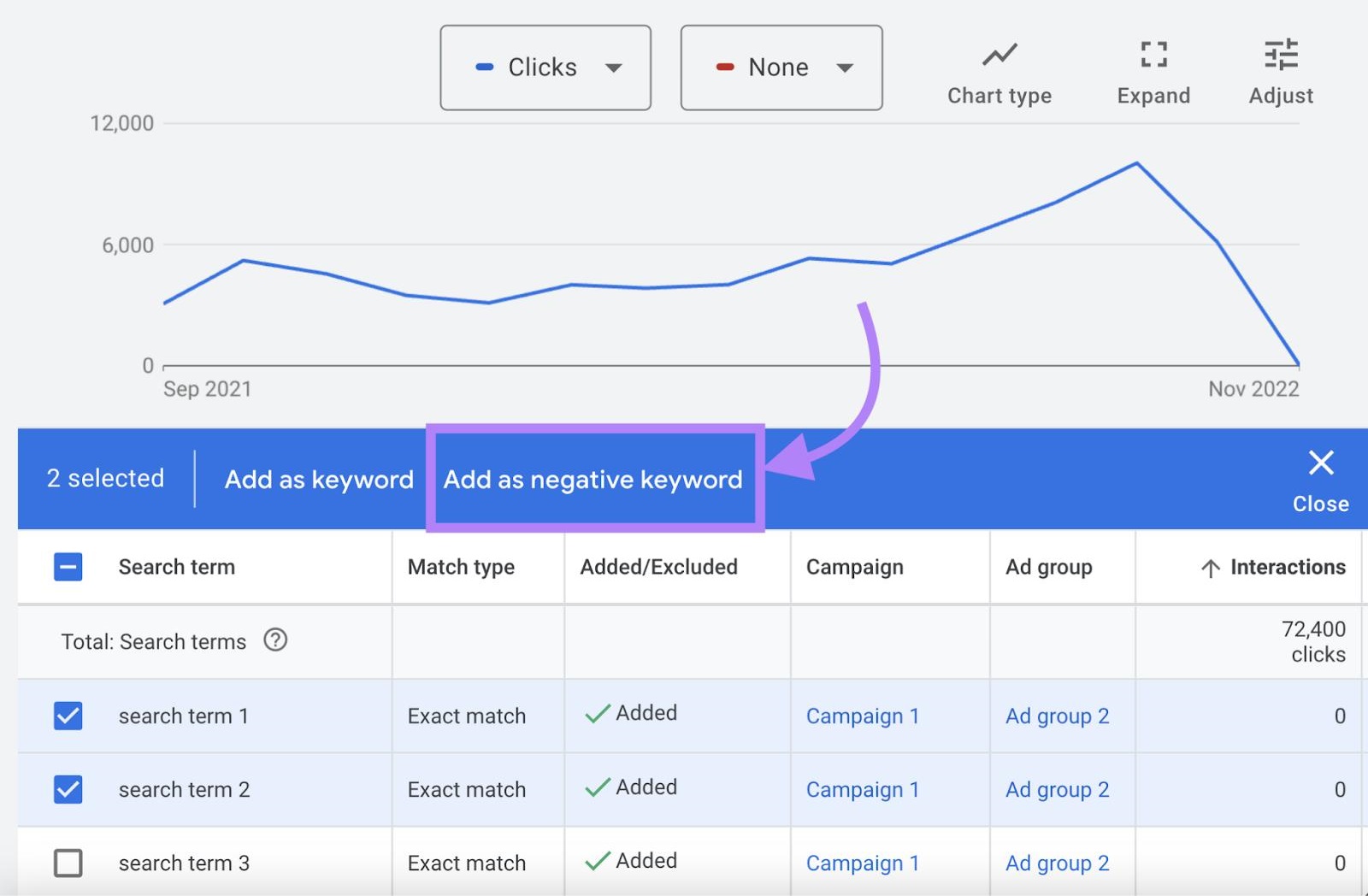
The Search terms report is one of the most useful tools for identifying irrelevant clicks. It shows the actual search terms that triggered your ads, helping you understand what potential customers were looking for when they clicked.
To stop irrelevant clicks on Google Ads, regularly review this report instead of relying only on the keywords you added to your campaign.
How to check your Search terms report
- Sign in to your Google Ads account.
- Open the relevant Search campaign.
- Navigate to the Search terms report. Its location may vary depending on your account interface.
- Review the search terms that generated clicks and spending.
- Identify queries unrelated to your products, services, or target audience.
- Add appropriate negative keywords or refine your existing keyword strategy.
- Continue reviewing the report to identify new sources of irrelevant traffic.
Example: If you offer paid digital marketing services, searches such as “digital marketing jobs,” “free digital marketing course,” or “digital marketing salary” may be irrelevant to your campaign.
However, do not exclude a search term just because it has not converted yet. Consider search intent, click volume, conversion tracking, and your typical sales cycle before making a decision.
2. Add Negative Keywords
Missing negative keywords are a common reason advertisers waste money on unrelated searches. Negative keywords help prevent your ads from appearing for searches that do not match your business goals.
If you want to stop irrelevant clicks on Google Ads, build a negative keyword list based on actual search terms and the types of traffic you do not want.
How to add negative keywords
- Open the campaign or ad group you want to improve.
- Navigate to its negative keyword settings.
- Add terms that clearly indicate irrelevant intent.
- Choose an appropriate negative match type.
- Apply shared negative keyword lists where suitable.
- Review the impact on traffic and conversions after making changes.
Negative keyword examples
| Business type | Potential negative keywords |
|---|---|
| Paid professional services | jobs, careers, salary |
| Premium software | cracked, pirated, torrent |
| Local repair services | DIY, tutorial, how to fix yourself |
| Paid training programs | free, jobs, salary |
| B2B service provider | personal use, consumer-only terms |
These are examples, not universal recommendations. A term such as “free” might be relevant if you offer free consultations or trials.
Also remember that negative keyword matching works differently from positive keyword matching. Negative keywords do not automatically cover every close variation or related meaning, so review important variations and search terms carefully.
3. Fix Your Location Targeting
Incorrect location settings can cause your ads to reach people outside your service area. This is especially costly for local businesses such as plumbers, electricians, chiropractors, and home service providers.
For example, if your business serves customers only in Bellingham, Washington, clicks from people outside your intended market may waste budget unless you can serve them remotely or in other areas.
How to improve location targeting
- Open your campaign’s location settings.
- Check the locations you have included.
- Remove regions, cities, or areas you cannot serve.
- Review excluded locations to confirm they are appropriate.
- Check the location options controlling whether ads can reach people based on their presence or interest in your target areas.
- For a local service business, consider the setting that focuses on people in or regularly in your targeted locations, where available.
- Review the geographic performance reports to identify locations generating irrelevant traffic.
Google Ads location options can allow reach beyond people physically present in a location, depending on the setting selected. Choose the option that matches your business model.
Tip: Do not target an entire country if your business serves only a few cities. More precise geographic targeting can help reduce irrelevant clicks, but avoid making your service area so narrow that you exclude genuine customers.
4. Control Broad Keyword Targeting
Broad match can help discover new searches and expand reach, but it may also trigger ads for searches that are not commercially relevant to your business.
If you want to stop irrelevant clicks on Google Ads, review whether your keyword match types are bringing in searches that do not align with your offering.
How to refine keyword targeting
- Review the match types assigned to your keywords.
- Check which search terms are generating irrelevant clicks.
- Consider phrase match or exact match for keywords where greater control is needed.
- Add negative keywords for recurring irrelevant searches.
- Keep broad match where it brings valuable traffic and supports your bidding strategy.
- Monitor conversions and cost per qualified lead after changing match types.
For example, a company selling commercial roofing services may find that a broad keyword related to roofing attracts searches for roofing courses, DIY repairs, or residential products.
Use search term data to decide whether to narrow the keyword, exclude specific queries, or retain the keyword because it produces valuable leads.
Avoid switching every keyword to exact match without reviewing the trade-off. More restrictive targeting can reduce irrelevant clicks, but it can also limit opportunities to reach new customers.
5. Improve Your Ad Copy to Attract the Right Audience
Your ad copy influences who chooses to click. If your headlines and descriptions are vague, people may click expecting a product, price, service, or offer that your business does not provide.
Clear advertising helps set expectations before users visit your website.
How to improve ad relevance
- Mention your actual service or product in the headline.
- Clearly communicate your target customer or service area when relevant.
- Explain important limitations, eligibility requirements, or service conditions.
- Avoid misleading offers and claims that your landing page cannot support.
- Use relevant assets, such as sitelinks and callouts, to clarify your offering.
- Ensure the landing page matches the promise made in your ad.
For example, if you provide commercial electrical services only, state that clearly instead of using a generic headline such as “Electrical Services Available.”
When people understand what you offer before clicking, your ads may attract a more relevant audience. Evaluate this change using qualified leads and conversions, not click-through rate alone.
6. Refine Audience Targeting and Campaign Settings
Audience settings, device performance, ad schedules, and other campaign options can influence who sees and clicks your ads. If you want to stop irrelevant clicks on Google Ads, examine these settings to find where your campaign is reaching people who are unlikely to become customers.
What to review
- Audience settings: Check whether your campaign is targeting or observing selected audiences. In Search campaigns, “Targeting” can restrict delivery to selected audience segments, while “Observation” generally allows broader reach with audience reporting and applicable bid adjustments.
- Ad schedule: Review whether certain days or hours generate clicks without qualified enquiries.
- Device performance: Compare mobile, desktop, and tablet traffic where reporting is available.
- Demographics: Review available demographic data when it is relevant to your business and campaign.
- Network settings: Check the networks included in the campaign and their performance, where applicable.
Make changes based on sufficient data. For example, do not exclude mobile traffic simply because mobile has a lower conversion rate if it still generates valuable leads or assists conversions later in the customer journey.
Also, audience targeting is not always the primary source of irrelevant clicks. Search intent and negative keywords are often the better starting points for Search campaigns.
7. Track Conversions and Optimize for Lead Quality
Clicks alone do not tell you whether your campaign is reaching the right audience. A visitor may click your ad, spend time on your website, and leave without contacting you because the service is not relevant to them.
To stop irrelevant clicks on Google Ads over the long term, measure what happens after the click and distinguish meaningful business outcomes from low-value interactions.
How to improve conversion tracking
- Verify that your Google Ads conversion tracking is configured correctly.
- Track meaningful actions, such as qualified form submissions, phone calls, bookings, or purchases.
- Review which campaigns, keywords, search terms, and locations generate qualified leads.
- Separate low-value actions, such as certain page views, from primary business conversions.
- Where your sales process supports it, import qualified-lead or offline conversion data.
- Use reliable conversion data to guide bidding and budget decisions.
If you use automated bidding, ensure the strategy is optimizing toward useful conversion actions. Training a campaign toward unqualified form submissions may encourage it to find more people who submit low-quality enquiries.
Conversion tracking does not directly block irrelevant clicks. It helps you identify which traffic is valuable and make smarter targeting and bidding decisions.
How to Identify and Reduce Wasted Google Ads Spend
Use this checklist to connect common problems with practical solutions.
| Problem | Recommended action |
|---|---|
| Clicks from unrelated searches | Review Search terms and add negative keywords |
| Clicks from outside your service area | Refine location targeting and location options |
| Too many loosely related searches | Review match types and negative keyword coverage |
| People expect a different service | Make ad copy and landing pages more specific |
| Traffic from unsuitable audiences | Review audience settings and relevant performance data |
| Many clicks but few qualified leads | Verify conversion tracking and evaluate lead quality |
| Spend concentrated in weak-performing segments | Review results before adjusting budgets or bidding |
Make changes in order of impact. Start with search terms and negative keywords, then review location settings and keyword match types. Next, improve ad messaging and conversion measurement.
This process helps reduce wasted spend without unnecessarily restricting useful traffic.
Final Thoughts
To stop irrelevant clicks on Google Ads, focus on the quality and intent of the traffic entering your website. Review the Search terms report, add appropriate negative keywords, correct location targeting, refine match types, and improve your ad messaging.
Use conversion tracking to measure whether clicks turn into qualified leads or sales. Make changes based on evidence rather than excluding traffic simply because it has not converted immediately.
The goal is not to eliminate every non-converting click. It is to reduce avoidable waste and invest your advertising budget in searches and audiences that are more likely to support your business goals.
Frequently Asked Questions
1. How do I stop irrelevant clicks on Google Ads?
Review the Search terms report, add relevant negative keywords, refine location targeting, and check your keyword match types. Improve your ad copy and measure qualified conversions to identify which changes improve traffic quality.
2. What are negative keywords in Google Ads?
Negative keywords prevent your ads from showing for searches containing specified terms according to the negative match rules. They help filter out irrelevant searches and reduce wasted ad spend.
3. Why am I getting clicks from people outside my target location?
Your campaign’s location settings may allow ads to reach people who show interest in a target area, even when they are not physically there. Review the location options and select the setting that best matches your business needs.
4. Should I stop using broad match keywords to reduce irrelevant clicks?
Not necessarily. Broad match can reach additional relevant searches, but it requires careful monitoring. Review actual search terms, add negative keywords, and test more restrictive match types when broader traffic is not sufficiently relevant.
5. How often should I review my Google Ads Search terms report?
Review it regularly, especially after launching a campaign, expanding keyword coverage, or changing targeting. The right frequency depends on traffic volume and budget. Higher-spend campaigns may need more frequent checks.
6. Can irrelevant clicks increase my Google Ads cost?
Yes. Clicks from people who are unlikely to become customers can consume your budget without generating useful results. The impact depends on your CPC, traffic volume, conversion rate, and business model.
7. How do I know if my Google Ads clicks are irrelevant?
Look for search terms unrelated to your offer, clicks from locations you cannot serve, and traffic that consistently fails to produce meaningful engagement or qualified conversions. Review enough data to distinguish genuinely irrelevant traffic from visitors who may convert later.